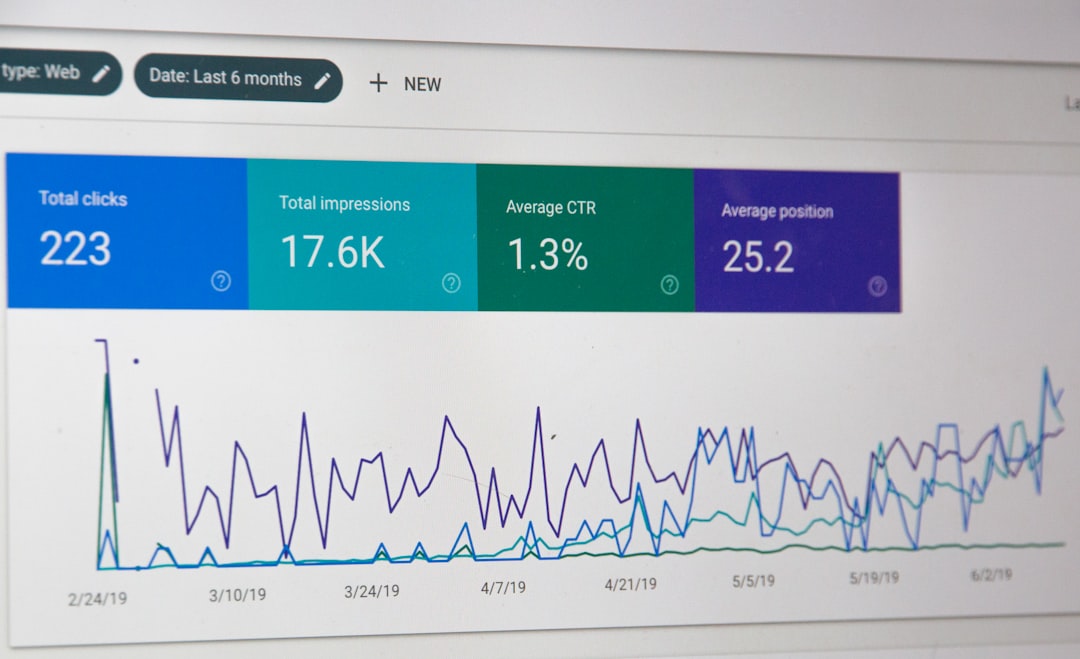
So, you want to get your website seen, right? That’s what Search Engine Optimization (SEO) is all about: making your site more visible in search engine results. It’s not a magic bullet, but a consistent effort to make sure search engines understand what your site is about and how valuable it is to users. Think of it as making your digital storefront easy for customers to find among all the other shops out there.
Understanding the SEO Landscape
Before we dive into the nitty-gritty, it’s good to have a grasp of what SEO actually entails. It’s essentially a set of practices designed to improve your website’s ranking in search engines like Google, Bing, and DuckDuckGo. The higher your ranking, the more organic (non-paid) traffic you’re likely to get. This isn’t just about keywords anymore; it’s a holistic approach that considers user experience, site structure, content quality, and much more.
Why SEO Matters for Your Website
In today’s digital world, if you’re not visible online, you’re practically invisible. SEO is crucial because:
- Increased Visibility: It gets your website in front of potential customers who are actively searching for what you offer.
- More Organic Traffic: Free traffic is always good traffic, and SEO brings in users who are genuinely interested in your content or products.
- Credibility and Trust: High rankings often signal to users that your site is authoritative and trustworthy.
- Better User Experience: Many SEO best practices, like fast loading times and mobile-friendliness, also improve the overall user experience.
- Long-Term Strategy: Unlike paid ads, good SEO can provide sustained results over time.
Laying the Foundation: Technical SEO Essentials
Technical SEO is the backstage crew of your website. It ensures that search engines can easily crawl, interpret, and index your content. If this foundation isn’t solid, even the best content might not get the visibility it deserves.
Imagine your website as a library. If the books are scattered everywhere, no one will find what they’re looking for. A clear, logical structure helps both users and search engines navigate your site effectively.
- URL Structure: Keep your URLs clean, concise, and descriptive. Use keywords where appropriate and avoid long, cryptic strings of characters. For example,
yourwebsite.com/blog/seo-tipsis much better thanyourwebsite.com/p?id=123&cat=5. - Site Hierarchy: Organize your content into logical categories and subcategories. A shallow hierarchy (meaning users don’t have to click through many levels to get to important content) is generally preferred.
- Internal Linking: Link relevant pages within your own website. This helps distribute “link equity” (think of it as authority) across your site and also helps users discover more of your content.
- XML Sitemaps: An XML sitemap is essentially a map that tells search engines all the pages available on your site for crawling. Submit it to Google Search Console and Bing Webmaster Tools.
- Robots.txt File: This file tells search engine crawlers which pages or sections of your site they shouldn’t crawl. Use it carefully to prevent indexing of internal admin pages, duplicate content, or staging sites.
Site Speed and Performance
Nobody likes a slow website. Search engines certainly don’t, and neither do your users. A slow site can lead to higher bounce rates and lower rankings.
- Image Optimization: Large image files are often the biggest culprits for slow loading times. Compress images without sacrificing quality and use appropriate formats (e.g., WebP, JPEG).
- Leverage Browser Caching: Caching stores parts of your website on a user’s browser, so when they revisit, the site loads faster.
- Minify CSS, JavaScript, and HTML: This involves removing unnecessary characters (like white space and comments) from your code without affecting its functionality, making files smaller and quicker to load.
- Choose a Reliable Host: Your web hosting provider plays a significant role in site speed. Invest in a good, reputable host.
- Content Delivery Networks (CDNs): CDNs store copies of your website content on servers located around the world. When a user visits your site, the content is delivered from the closest server, reducing latency.
Mobile-Friendliness
With most internet traffic coming from mobile devices, having a mobile-friendly website isn’t optional – it’s essential. Google uses mobile-first indexing, meaning it primarily uses the mobile version of your content for indexing and ranking.
- Responsive Design: This ensures your website adapts and displays perfectly on any screen size, from desktops to smartphones. It’s the recommended approach.
- Readable Fonts: Make sure your fonts are legible on smaller screens without requiring users to pinch and zoom.
- Touch-Friendly Elements: Ensure buttons and links are large enough and spaced far enough apart to be easily tapped with a finger.
- Fast Loading on Mobile: Mobile users are even less patient than desktop users when it comes to loading times. Optimize accordingly.
Crafting Content that Ranks: On-Page SEO
Once your technical foundation is strong, it’s time to focus on the content itself. On-page SEO involves optimizing individual web pages to rank higher and earn more relevant traffic in search results.
Keyword Research and Intent
Keywords are the bridge between what people are searching for and the content you provide. But it’s not just about stuffing keywords anymore; it’s about understanding user intent.
- Identify Relevant Keywords: Use tools like Google Keyword Planner, SEMrush, Ahrefs, or even Google’s “People also ask” and “Related searches” features to find keywords your target audience uses.
- Understand Search Intent:
- Informational: The user is looking for information (e.g., “how to fix a leaky faucet”).
- Navigational: The user wants to go to a specific website (e.g., “Facebook login”).
- Transactional: The user intends to buy something (e.g., “buy noise-cancelling headphones”).
- Commercial Investigation: The user is researching products or services with the intent to buy later (e.g., “best laptops for students”).
- Tailor your content to match the intent behind the keywords you target.
- Long-Tail Keywords: These are longer, more specific keyword phrases (e.g., “best organic coffee beans for pour-over”). They often have lower search volume but higher conversion rates because they indicate more specific user intent.
High-Quality Content Creation
Content is king, and high-quality, relevant content is the crown jewel of your SEO strategy. Google wants to provide the most helpful and authoritative results to its users.
- Be Comprehensive and Authoritative: Provide in-depth information that fully covers the topic. Don’t just skim the surface.
- Originality: Don’t just regurgitate what others have said. Offer fresh perspectives, unique insights, or detailed case studies.
- Readability: Use clear, concise language. Break up long paragraphs with headings, subheadings, bullet points, and images to make your content easy to digest.
- Engaging Format: Use various content formats, such as blog posts, videos, infographics, and interactive tools, to keep users interested.
- Regular Updates: Keep your content fresh and up-to-date. Google favors regularly updated content, especially for evergreen topics.
- E-A-T (Expertise, Authoritativeness, Trustworthiness): These are key factors Google considers. Demonstrate your expertise, build authority through internal/external links, and ensure your site is trustworthy (e.g., secure, accurate information).
Optimizing HTML Elements
These are the elements within your page’s code that tell search engines what your content is about.
- Title Tags: This is what appears in the browser tab and as the clickable headline in search results.
- Keep it concise (around 50-60 characters).
- Place your primary keyword near the beginning.
- Make it compelling and accurately reflect the page’s content.
- Meta Descriptions: This is the short summary (around 150-160 characters) that appears below the title in search results.
- While not a direct ranking factor, a good meta description can significantly increase your click-through rate (CTR) from search results.
- Include your target keyword, make it descriptive, and include a call to action if appropriate.
- Header Tags (H1, H2, H3, etc.):
- Use an H1 tag for your main page title (only one per page).
- Use H2, H3, etc., to break up your content into logical sections and sub-sections.
- Include relevant keywords naturally within your headings.
- Image Alt Text: This text describes an image for visually impaired users and for search engines.
- Describe the image accurately.
- Include relevant keywords where it makes sense, but avoid keyword stuffing.
- It’s important for both accessibility and SEO.
Building Authority: Off-Page SEO Strategies
Off-page SEO refers to actions taken outside of your website to impact its ranking within search engine results pages (SERPs). The main pillar of off-page SEO is link building.
Backlinks: Votes of Confidence
Backlinks are links from other websites to your website. Think of them as votes of confidence. The more high-quality, relevant backlinks you have, the more authoritative and trustworthy your site appears to search engines.
- Quality over Quantity: A few backlinks from highly authoritative and relevant sites are far more valuable than many links from low-quality, spammy sites.
- Relevance: Links from sites in your industry or niche carry more weight.
- Anchor Text: This is the visible, clickable text in a hyperlink. Aim for natural and varied anchor text, some branded, some keyword-rich, and some generic.
- How to Earn Backlinks:
- Content Promotion: Create amazing content that others want to link to. Promote it on social media and reach out to relevant bloggers and journalists.
- Guest Blogging: Write articles for other websites in your niche and include a link back to your site in your bio or within the content (if relevant).
- Broken Link Building: Find broken links on other websites, inform the webmaster, and suggest your content as a replacement.
- Competitor Analysis: See who is linking to your competitors and try to earn links from those same sites.
- Directory Submissions: Submit your website to reputable, industry-specific directories.
Social Signals
While social media shares and likes aren’t direct ranking factors, they play an indirect role in SEO.
- Increased Visibility: Social media can drive traffic to your website, and that traffic is a signal to search engines that your content is valuable.
- Content Amplification: More shares mean more eyes on your content, which increases the likelihood of gaining backlinks.
- Brand Building: A strong social presence helps build brand recognition and trust, which can indirectly influence search engine rankings.
Local SEO (If Applicable)
If your business serves a specific geographical area, local SEO is critical.
- Google My Business (GMB): Create and optimize your GMB profile. Include accurate business information (name, address, phone number), hours, photos, and encourage reviews. This is immensely important for showing up in “near me” searches.
- NAP Consistency: Ensure your Name, Address, and Phone number are consistent across all online directories and your website.
- Local Citations: Get listed in relevant local directories (Yelp, Yellow Pages, industry-specific directories).
- Customer Reviews: Encourage customers to leave reviews on Google, Yelp, and other platforms. Respond to reviews, both positive and negative.
User Experience (UX) and Engagement Signals
Beyond technical and content factors, how users interact with your website sends important signals to search engines about its quality and relevance.
Core Web Vitals
Google introduced Core Web Vitals as a set of specific metrics related to speed, responsiveness, and visual stability. These are direct ranking factors.
- Largest Contentful Paint (LCP): Measures loading performance. Aim for an LCP of 2.5 seconds or less.
- First Input Delay (FID): Measures interactivity. Aim for an FID of 100 milliseconds or less.
- Cumulative Layout Shift (CLS): Measures visual stability. Aim for a CLS of 0.1 or less.
- Use Google Search Console and Lighthouse to monitor and improve these metrics.
Bounce Rate
This is the percentage of visitors who land on your site and leave without interacting further. A high bounce rate can indicate poor user experience or that your content isn’t meeting user expectations.
- Relevant Content: Ensure your content matches the user’s search intent.
- Clear Call to Actions: Guide users on what to do next.
- Easy Navigation: Make it simple for users to find what they’re looking for.
- Fast Loading: As mentioned, speed is crucial.
Dwell Time (Time on Page)
This refers to the amount of time a user spends on your page after clicking through from search results. A longer dwell time generally indicates that users are finding your content engaging and useful.
- Engaging Content: Write compelling, well-structured, and comprehensive content.
- Multimedia: Incorporate videos, interactive elements, and infographics.
- Internal Linking: Encourage users to explore more of your site.
Monitoring and Adapting: The Ongoing SEO Journey
SEO isn’t a one-and-done task; it’s a continuous process. The digital landscape and search engine algorithms are constantly evolving, so you need to keep an eye on your performance and adapt.
Analytics and Reporting
Tools help you understand how your website is performing and identify areas for improvement.
- Google Analytics: Track website traffic, user behavior, conversions, and more. Set up goals to measure key actions.
- Google Search Console: Monitor your search performance, identify crawling errors, see which keywords you’re ranking for, and submit sitemaps.
- Bing Webmaster Tools: Similar to GSC but for Bing.
- Rank Tracking Tools: Use tools like SEMrush, Ahrefs, or Moz to monitor your keyword rankings over time.
Staying Updated and Iterating
- Algorithm Changes: Keep an eye on major algorithm updates from Google (e.g., core updates, Panda, Penguin). Follow reputable SEO news sources.
- Competitor Analysis: Regularly check what your competitors are doing well or where they are falling short.
- Content Audits: Periodically review your existing content to identify opportunities for updates, improvements, or consolidation.
- Technical Audits: Regularly check for broken links, crawl errors, and other technical issues.
By consistently applying these strategies and staying adaptable, you’ll be well on your way to optimizing your website for SEO and achieving better visibility in search engine results. It takes patience and persistence, but the long-term benefits are definitely worth the effort.